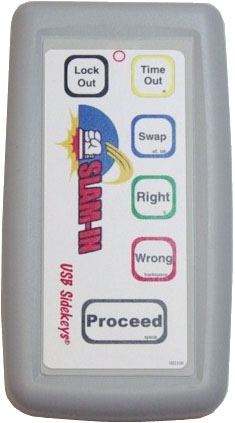
You may operate the Slam-In Scoreboard software in Play Mode using either a host remote
control, your mouse, or the keyboard. From a single host/moderator standpoint, a host remote
control is best since it frees you to move around the room while leading the game:
The second easiest way to operate the Slam-In Scoreboard software in our opinion is to use its
built-in keyboard shortcuts:
· Play Question/Start Timer = Spacebar
· Right Answer = B key
· Wrong Answer = Backspace
· Time Out = W key
Operating the program with a mouse might be the most intuitive, especially for new users, but it
takes longer than either of the above methods, and it introduces the possibility of highlighting
and/or clicking on something "on your way" to a button that could cause you to have to stop the
game and correct errors. Seeing the mouse cursor move about the screen is also distracting for
an audience viewing the scoreboard during a match.